Friday, 30 April 2021

Count of Smaller Numbers After Self

import java.util.ArrayList;

import java.util.Collections;

import java.util.List;


/*https://www.youtube.com/watch?v=buDoT9ESw1c

*You are given an integer array nums and you have to return a new counts array. The counts array has the property

where counts[i] is the number of smaller elements to the right of nums[i].

Example:

Input: [5,2,6,1] Output: [2,1,1,0]

* */

public class CountOfSmallerNumbersAfterSelf {

    public static void main(String[] args) {

        int[] arr  ={7,5,2,6,1};

        Node root = new Node(arr[arr.length-1]);

        List<Integer> resultList = new ArrayList<>();

        resultList.add(0);

        for(int i=arr.length-2;i>=0;i--){

            resultList.add(insertNode(root,arr[i]));

        }

        Collections.reverse(resultList);

        System.out.println(resultList);


    }


    static int insertNode(Node root, int value){

        int result = 0;

        boolean isConnected = false;

        while (!isConnected){

            if(value<=root.value){

                //apend in left

                root.count++;

                if(root.left==null){

                    Node newNode = new Node(value);

                    root.left = newNode;

                    isConnected = true;

                }else{

                    root = root.left;

                }

            }else{

              //  append in right

                result = result+root.count;

                if(root.right==null){

                    Node newNode = new Node(value);

                    root.right = newNode;

                    isConnected = true;

                }else{

                    root = root.right;

                }

            }

        }


        return result;

    }


}


class Node{

    Node left;

    Node right;

    int value;

    int count=1;

    public Node(int value){

        this.value = value;

    }

}


Friday, 29 January 2021

Method overriding rule important

 1. return type can be different  ,  if they return a subtype like parent class return type Number and child class Integer.

2.Another worth noting rule of method overriding in Java is that the overriding  method can not throw checked Exception which is higher in the hierarchy than the overridden method. This means if the overridden method throws IOException than the overriding method can not throw java.lang.Exception in its throws clause because of java.lang.Exception comes higher than IOException in Exception hierarchy. 

3. You can not override private, static and final the method in Java. private and static method are bonded during compile time using static binding in Java and doesn't resolve during runtime. the overriding the final method in Java is a compile-time error. Though private and static methods can be hidden if you declare another method with the same and signature in the subclass.

4.to override a method in Java is that the overriding method can not reduce the accessibility of the overridden method in Java. For example, if the overridden method is public than the overriding method can not be protected, private or package-private

Thursday, 21 January 2021

How to set default java version

 sudo update-java-alternatives --list

to list off all the Java installations on a machine by name and directory, and then run

sudo  update-java-alternatives --set [JDK/JRE name e.g. java-8-oracle]

Thursday, 14 January 2021

How does SSL really work?

Ref: https://stackoverflow.com/questions/470523/how-does-ssl-really-work

HTTPS is combination of HTTP and SSL(Secure Socket Layer) to provide encrypted communication between client (browser) and web server (application is hosted here).


Why is it needed?


HTTPS encrypts data that is transmitted from browser to server over the network. So, no one can sniff the data during transmission.


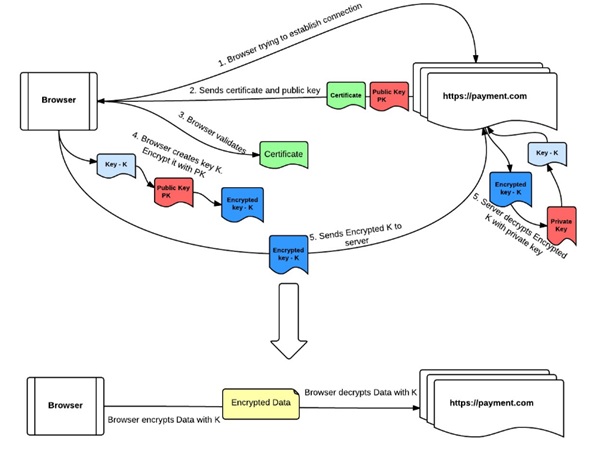
How HTTPS connection is established between browser and web server?


Browser tries to connect to the https://payment.com.

payment.com server sends a certificate to the browser. This certificate includes payment.com server's public key, and some evidence that this public key actually belongs to payment.com.

Browser verifies the certificate to confirm that it has the proper public key for payment.com.

Browser chooses a random new symmetric key K to use for its connection to payment.com server. It encrypts K under payment.com public key.

payment.com decrypts K using its private key. Now both browser and the payment server know K, but no one else does.

Anytime browser wants to send something to payment.com, it encrypts it under K; the payment.com server decrypts it upon receipt. Anytime the payment.com server wants to send something to your browser, it encrypts it under K. 


Thursday, 10 December 2020

Multithread-synchornized Monitor object

public void add(int value){

    synchronized(this){

       this.count += value;   

    }

  } 

Notice how the Java synchronized block construct takes an object in parentheses. In the example "this" is used, which is the instance the add method is called on. The object taken in the parentheses by the synchronized construct is called a monitor object.


below using class level lock

public void add(int value){

    synchronized(Data.class){

       this.count += value;   

    }

  } 


In below code thread run one by one, once a thread complete his work then another will start due to lock on same string value "abc", then the compiler might actually use the same String object behind the scenes. 

 void method1(String threadName){
         synchronized ("abc") {
             System.out.println(threadName + ":method 1 running");
             try {
                 Thread.sleep(2000);
             } catch (InterruptedException e) {
                 e.printStackTrace();
             }
             System.out.println(threadName + ":sleep over");
             method2(threadName);
         }
    }

      void method2(String threadName){
        synchronized ("abc"){
        System.out.println(threadName+":method 2 running");
        try {
            Thread.sleep(2000);
        } catch (InterruptedException e) {
            e.printStackTrace();
        }
        System.out.println(threadName+":sleep over");
    }}

Tuesday, 8 December 2020

Multi threading example - synchonized ,static

public class Test {

    public static void main(String[] args) {

        sample obj = new sample();


        t1 tt1 = new t1(obj);

        t2 tt2 = new t2(obj);

        tt1.start();

        tt2.start();

    }

}

//It’s possible that both static synchronized and non static synchronized method can run simultaneously or concurrently because they lock on different object.

class sample{

    public synchronized static void m1(String name){

        System.out.println(name+":m1");

        try {

            Thread.sleep(2000);

        } catch (InterruptedException e) {

            e.printStackTrace();

        }

    }

    public synchronized void m2(String name){

        System.out.println(name+":m2");

        try {

            Thread.sleep(2000);

        } catch (InterruptedException e) {

            e.printStackTrace();

        }

    }

}


class t1 extends  Thread{

    sample s;

    t1(sample s){

        this.s =s;

    }

    @Override

    public void run() {

        s.m1(Thread.currentThread().getName());

        s.m2(Thread.currentThread().getName());

    }

}


class t2 extends Thread{

    sample s;

    t2(sample s){

        this.s =s;

    }

    @Override

    public void run() {

        s.m2(Thread.currentThread().getName());

        s.m1(Thread.currentThread().getName());


    }

}

output: 

Thread-1:m2

Thread-0:m1

wait 2 second

Thread-0:m2

Thread-1:m1 


or

Thread-0:m1

Thread-1:m2

wait 2 second

Thread-0:m2

Thread-1:m1

Multithreading examples

class TwoT1 implements Runnable{

    Data data;

    TwoT1(Data data){

        this.data = data;

    }

    @Override

    public void run() {

        data.method1("t1");

    }

}


class TwoT2 implements Runnable{

    Data data;

    TwoT2(Data data){

        this.data = data;

    }

    @Override

    public void run() {

        data.method2("t2");

    }

}

public class Two {

    public static void main(String[] args) {

        Data data = new Data();

        Thread t1 = new Thread(new TwoT1(data));

        Thread t2 = new Thread(new TwoT2(data));

        t1.start();

        t2.start();

    }

}

 case1:

class Data{

    synchronized void method1(String threadName){

        System.out.println(threadName+":method 1 running");

        method2(threadName);

    }


     void method2(String threadName){

        System.out.println(threadName+":method 2 running");

    }


}

sample output1:

t1:method 1 running

t1:method 2 running

t2:method 2 running

sample output2:

t2:method 2 running

t1:method 1 running

t1:method 2 running

sample output3:

t1:method 1 running

t2:method 2 running

t1:method 2 running

output: Running properly both threads will run parallel because method2 not required any lock

case2:

class Data{

    synchronized void method1(String threadName){

        System.out.println(threadName+":method 1 running");

        try {

            Thread.sleep(2000);

        } catch (InterruptedException e) {

            e.printStackTrace();

        }

        method2(threadName);

    }


    synchronized void method2(String threadName){

        System.out.println(threadName+":method 2 running");

    }


    //running proper always execute first t1/t2 thread complete

}

output sample1:

t1:method 1 running

wait for 2 second

t1:method 2 running

t2:method 2 running


output sample2:

t2:method 2 running

t1:method 1 running

wait for 2 second

t1:method 2 running


output: Running proper execute either thread1 complete or thread2 complete if first thread1 get lock then it execute thread1 complete then thread2 get lock, if first thread2 get lock then it execute thread2 complete then thread1.

case3:

class Data{

    synchronized void method1(String threadName){

        System.out.println(threadName+":method 1 running");

        try {

            Thread.sleep(2000);

        } catch (InterruptedException e) {

            e.printStackTrace();

        }

        method2(threadName);

    }


    synchronized static void method2(String threadName){

        System.out.println(threadName+":method 2 running");

    }


    //running proper t1 and t2 will run prallel due to static and non static locks

}

output sample1:

t1:method 1 running

t2:method 2 running

wait 2 second

t1:method 2 running

output sample2:

t2:method 2 running

t1:method 1 running

wait for 2 second

t1:method 2 running

output : running proper thread1 and thread2 execute parallel due to static and non static locks as static is a class level lock and non-static is object level lock

case4:

class Data{

    synchronized static void method1(String threadName){

        System.out.println(threadName+":method 1 running");

        try {

            Thread.sleep(2000);

        } catch (InterruptedException e) {

            e.printStackTrace();

        }

        method2(threadName);

    }


    synchronized static void method2(String threadName){

        System.out.println(threadName+":method 2 running");

    }


    //running proper always execute first t1/t2 thread complete

}

output sample1:

t1:method 1 running

wait for 2 second

t1:method 2 running

t2:method 2 running


output sample2:

t2:method 2 running

t1:method 1 running

wait for 2 second

t1:method 2 running

output: Running proper execute either thread1 complete or thread2 complete if first thread1 get lock then it execute thread1 complete then thread2 get lock, if first thread2 get lock then it execute thread2 complete then thread1 as both method are static means both thread required class level lock.

links for Data Structure

  1) 𝐁𝐞𝐜𝐨𝐦𝐞 𝐌𝐚𝐬𝐭𝐞𝐫 𝐢𝐧 𝐋𝐢𝐧𝐤𝐞𝐝 𝐋𝐢𝐬𝐭:  https://lnkd.in/gXQux4zj 2) 𝐀𝐥𝐥 𝐭𝐲𝐩𝐞𝐬 𝐨𝐟 𝐓𝐫𝐞𝐞 𝐓𝐫𝐚𝐯𝐞𝐫𝐬𝐚𝐥𝐬...