Kakfa Architecture:
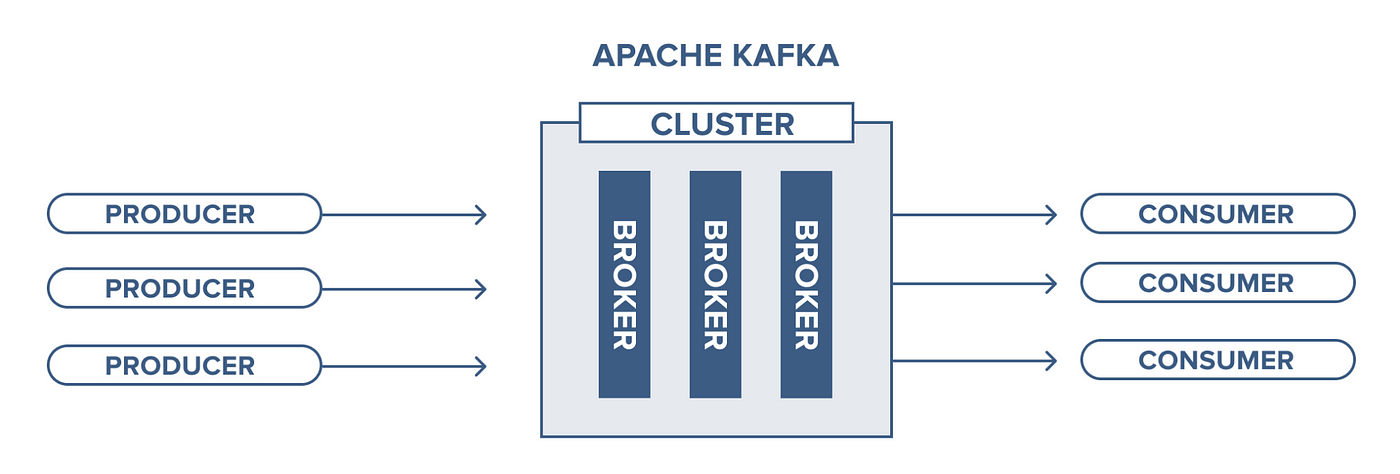
Kafka is a Distributed Streaming Platform or a Distributed Commit Log
Distributed
Kafka works as a cluster of one or more nodes that can live in different Datacenters, we can distribute data/ load across different nodes in the Kafka Cluster, and it is inherently scalable, available, and fault-tolerant.
Streaming Platform
Kafka stores data as a stream of continuous records which can be processed in different methods.
Commit Log When you push data to Kafka it takes and appends them to a stream of records, like appending logs in a log file or if you’re from a Database background like the WAL. This stream of data can be “Replayed” or read from any point in time.
Is Kafka a message queue?
It certainly can act as a message queue, but it’s not limited to that. It can act as a FIFO queue, as a Pub/ Sub messaging system, a real-time streaming platform. And because of the durable storage capability of Kafka,
Having said all of that, Kafka is commonly used for real-time streaming data pipelines, i.e. to transfer data between systems, building systems that transform continuously flowing data, and building event-driven systems.
Message
A message is the atomic unit of data for Kafka. Let’s say that you are building a log monitoring system, and you push each log record into Kafka, your log message is a JSON that has this structure.
{
"level" : "ERROR",
"message" : "NullPointerException"
}
When you push this JSON into Kafka you are actually pushing 1 message. Kafka saves this JSON as a byte array, and that byte array is a message for Kafka. This is that atomic unit, a JSON having two keys “level” and “message”. But it does not mean you can’t push anything else into Kafka, you can push String, Integer, a JSON of different schema, and everything else, but we generally push different types of messages into different topics (we will get to know what is a topic soon).
Messages might have an associated “Key” which is nothing but some metadata, which is used to determine the destination partition (will know soon as well) for a message.
Topic
Topics, as the name suggests, are the logical categories of messages in Kafka, a stream of the same type of data. Going back to our previous example of the logging system, let’s say our system generates application logs, ingress logs, and database logs and pushes them to Kafka for other services to consume. Now, these three types of logs can be logically be divided into three topics, appLogs, ingressLogs, and dbLogs. We can create these three topics in Kafka, whenever there’s an app log message, we push it to appLogs topic and for database logs, we push it to the dbLogs topic. This way we have logical segregation between messages, sort of like having different tables for holding different types of data.
Partitions
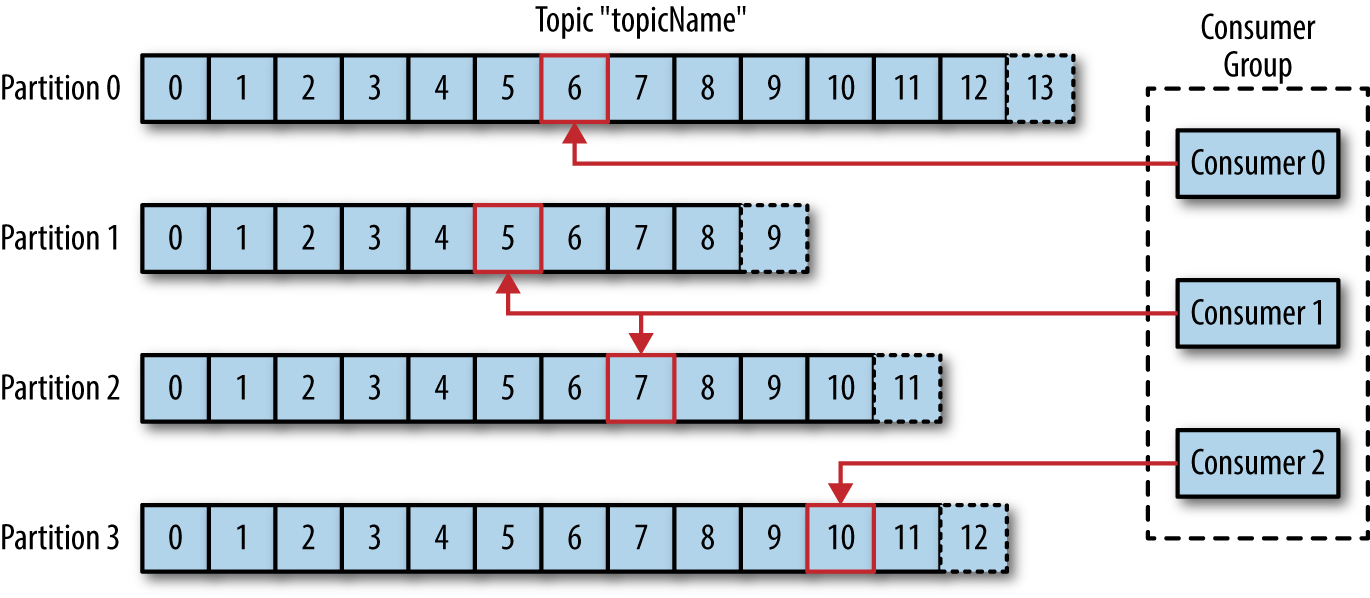
Partition is analogous to shard in the database and is the core concept behind Kafka’s scaling capabilities. Let’s say that our system becomes really popular and hence there are millions of log messages per second. So now the node on which appLogs topic is present, is unable to hold all the data that is coming in. We initially solve this by adding more storage to our node i.e. vertical scaling. But as we all know vertical scaling has its limit, once that threshold is reached we need to horizontally scale, which means we need to add more nodes and split the data between the nodes. When we split data of a topic into multiple streams, we call all of those smaller streams the “Partition” of that topic.

This image depicts the idea of partitions, where a single topic has 4 partitions, and all of them hold a different set of data. The blocks you see here are the different messages in that partition. Let’s imagine the topic to be an array, now due to memory constraint we have split the single array into 4 different smaller arrays. And when we write a new message to a topic, the relevant partition is selected and then that message is added at the end of the array.
An offset for a message is the index of the array for that message. The numbers on the blocks in this picture denote the Offset, the first block is at the 0th offset and the last block would on the (n-1)th offset. The performance of the system also depends on the ways you set up partitions, we will look into that later in the article. (Please note that on Kafka it is not going to be an actual array but a symbolic one
Producer
A producer is the Kafka client that publishes messages to a Kafka topic. Also one of the core responsibilities of the Producer is to decide which partition to send the messages to. Depending on various configuration and parameters, the producer decides the destination partition, let’s look a bit more into this.
- No Key specified => When no key is specified in the message the producer will randomly decide partition and would try to balance the total number of messages on all partitions.
- Key Specified => When a key is specified with the message, then the producer uses Consistent Hashing to map the key to a partition. Don’t worry if you don’t know what consistent hashing is, in short, it’s a hashing mechanism where for the same key same hash is generated always, and it minimizes the redistribution of keys on a re-hashing scenario like a node add or a node removal to the cluster. So let’s say in our logging system we use source node ID as the key, then the logs for the same node will always go to the same partition. This is very relevant for the order guarantees of messages in Kafka, we will shortly see how.
- Partition Specified => You can hardcode the destination partition as well.
- Custom Partitioning logic => We can write some rules depending on which the partition can be decided.
Consumer
So far we have produced messages, to read those messages we use Kafka consumer. A consumer reads messages from partitions, in an ordered fashion. So if 1, 2, 3, 4 was inserted into a topic, the consumer will read it in the same order. Since every message has an offset, every time a consumer reads a message it stores the offset value onto Kafka or Zookeeper, denoting that it is the last message that the consumer read. So in case, a consumer node goes down, it can come back and resume from the last read position. Also if at any point in time a consumer needs to go back in time and read older messages, it can do so by just resetting the offset position.
Consumer Group
A consumer group is a collection of consumers that work together to read messages from a topic. There are some very interesting concepts here, let’s go through them.
- Fan out exchange => A single topic can be subscribed to by multiple consumer groups. Let’s say that you are building an OTP service.
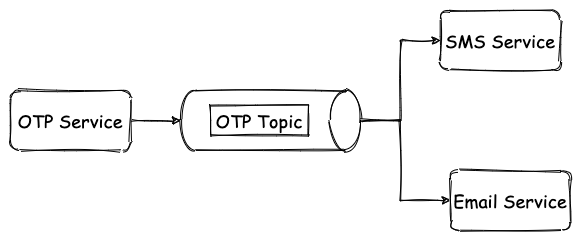
Now you need to send both text and email OTP. So your OTP service can put the OTP in Kafka, and then the SMS Service consumer group and Email Service consumer group can both receive the message and can then send the SMS and email out.
2. Order guarantee => Now we have seen that a topic can be partitioned and multiple consumers can consumer from the same topic, then how do you maintain the order of messages on the consumer-end one might ask. Good question. One partition can not be read by multiple consumers in the same consumer group. This is enabled by the consumer group only, only one consumer in the group gets to read from a single partition. Let me explain.
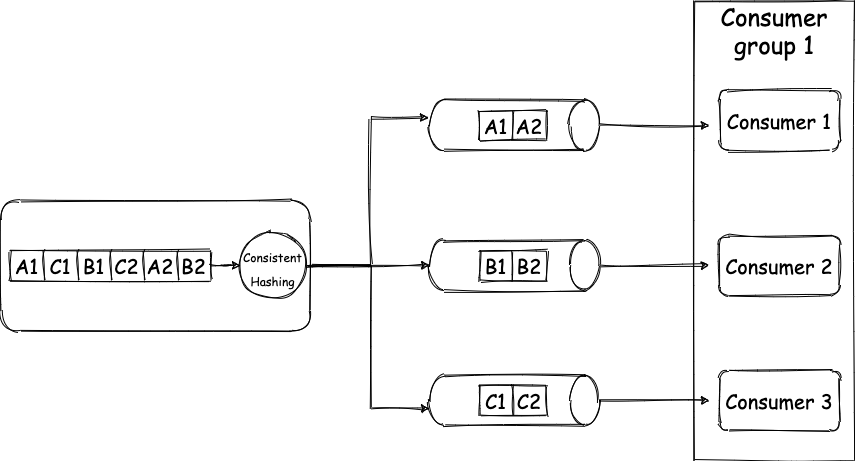
So your producer produces 6 messages. Each message is a key-value pair, for key “A” value is “1”, for “C” value is “1”, for “B” value is “1”, for “C” value is “2” ….. “B” value is “2”. (Please note that by key I mean the message key that we discussed earlier and not the JSON or Map key). Our topic has 3 partitions, and due to consistent hashing messages with the same key always go to the same partition, so all the messages with “A” as the key will get grouped and the same for B and C. Now as each partition has only one consumer, they get messages in order only. So the consumer will receive A1 before A2 and B1 before B2, and thus the order is maintained, tada 🎉. Going back to our logging system example the keys are the source node ID, then all the logs for node1 will go to the same partition always. And since the messages are always going to the same partition, we will have the order of the messages maintained.
This will not be possible if the same partition had multiple consumers in the same group. If you read the same partition in the different consumers who are in different groups, then also for each consumer group the messages will end up ordered.
So for 3 partitions, you can have a max of 3 consumers, if you had 4 consumers, one consumer will be sitting idle. But for 3 partitions you can have 2 consumers, then one consumer will read from one partition and one consumer will read from two partitions. If one consumer goes down in this case, the last surviving consumer will end up reading from all the three partitions, and when new consumers are added back, again partition would be split between consumers, this is called re-balancing.
Cluster
A Kafka cluster is a group of broker nodes working together to provide, scalability, availability, and fault tolerance. One of the brokers in a cluster works as the Controller, which basically assigns partitions to brokers, monitors for broker failure to do certain administrative stuff.
In a cluster, partitions are replicated on multiple brokers depending on the replication factor of the topic to have failover capability. What I mean is, for a topic of replication factor 3, each partition of that topic will live onto 3 different brokers. When a partition is replicated onto 3 brokers, one of the brokers will act as the leader for that partition and the rest two will be followers. Data is always written on the leader broker and then replicated to the followers. This way we do not lose data nor availability of the cluster, and if the leader goes down another leader is elected
Let’s look at a practical example. I am running a 5 node Kafka cluster locally and I run this command
kafka-topics — create — zookeeper zookeeper:2181 — topic applog — partitions 5 — replication-factor 3If we break down the command, it becomes
- Create a topic
- Create 5 partitions of that topic
- And replicate data of all 5 topics into a total of 3 nodes
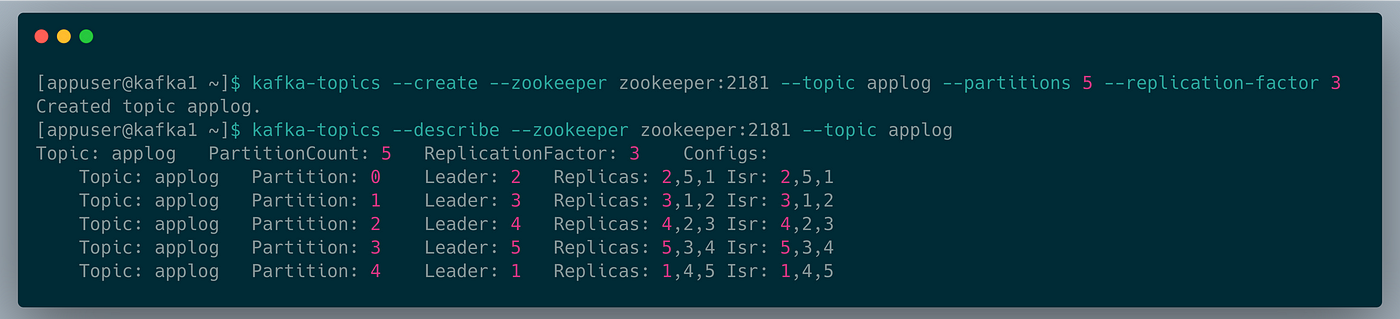
This screenshot describes the topic we just created.
Let’s take Partition 0, the leader node for this partition is node 2. The data for this partition is replicated on nodes 2,5 and 1.S o one partition is replicated on 3 nodes and this behavior is repeated for all 5 partitions. And also if you see, all the leader nodes for each partition are different. So to utilize the nodes properly, the Kafka controller broker distributed the partitions evenly across all nodes. And you can also observe the replications are also evenly distributed and no node is overloaded. All of these are done by the controller Broke with the help of Zookeeper.
Since you have understood clustering now, you can see to scale we could partition a topic even more and for each partition, we could add a dedicated consumer node, and that way we can horizontally scale.
Zookeeper
Kafka does not function without zookeeper( at least for now, they have plans to deprecate zookeeper in near future). Zookeeper works as the central configuration and consensus management system for Kafka. It tracks the brokers, topics, and partition assignment, leader election, basically all the metadata about the cluster.
Producer
You can send messages in 3 ways to Kafka.
- Fire and forget
- Synchronous send
- Asynchronous send.
All of them have their performance vs consistency pitfalls.
You can configure characteristics of acknowledgment on the producer as well.
- ACK 0: Don’t wait for an ack |FASTEST
- ACK 1: Consider sent when leader broker received the message |FASTER
- ACK All: Consider sent when all replicas received the message |FAST
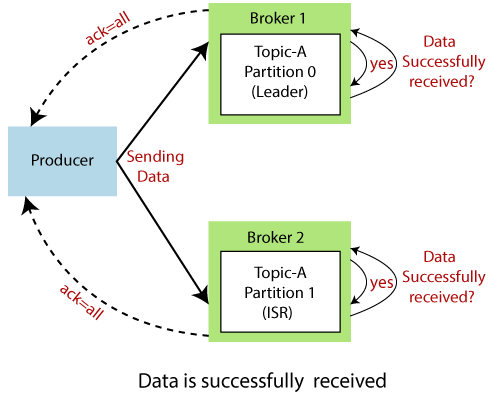
You can compress and batch messages on producer before sendig to broker.
It gives high throughput and lowers disk usage but raises CPU usage.
Avro Serializer/ Deserializer
If you use Avro as the serializer/ deserializer instead of normal JSON, you will have to declare your schema upfront but this gives better performance and saves storage.
Consumer
Poll loop
Kafka consumer constantly polls data from the broker and it’s no the other way round.
You can configure partition assignment strategy
- Range: Consumer gets consecutive partitions
- Round Robin: Self-explanatory
- Sticky: Tries to create minimum impact while rebalancing keeping most of the assignment as is
- Cooperative sticky: Sticky but allows cooperative rebalancing
Batch size
We can configure how many records and how much data is returned per poll call.
Commit offset
On message read we can update the offset position for the consumer, this is called committing the offset. Auto commit can be enabled or the application can commit the offset explicitly. This can be done both synchronously and asynchronously.
Ref Source : https://medium.com/inspiredbrilliance/kafka-basics-and-core-concepts-5fd7a68c3193#:~:text=Kafka%20works%20as%20a%20cluster,available%2C%20and%20fault%2Dtolerant.&text=Kafka%20stores%20data%20as%20a,be%20processed%20in%20different%20methods.
Additional Notes:
- Each message will be stored in the broker disk and will receive an offset (unique identifier). This offset is unique at the partition level, each partition has its owns offsets. That is one more reason that makes Kafka so special, it stores the messages in the disk (like a database, and in fact, Kafka is a database too) to be able to recover them later if necessary. Different from a messaging system, that the message is deleted after being consumed;
- The producers use the offset to read the messages, they read from the oldest to the newest. In case of consumer failure, when it recovers, will start reading from the last offset;
Brokers
As said before, Kafka works in a distributed way. A Kafka cluster may contain many brokers as needed.
Each broker in a cluster is identified by an ID and contains at least one partition of a topic. To configure the number of the partitions in each broker, we need to configure something called Replication Factor when creating a topic. Let’s say that we have three brokers in our cluster, a topic with three partitions and a Replication Factor of three, in that case, each broker will be responsible for one partition of the topic.
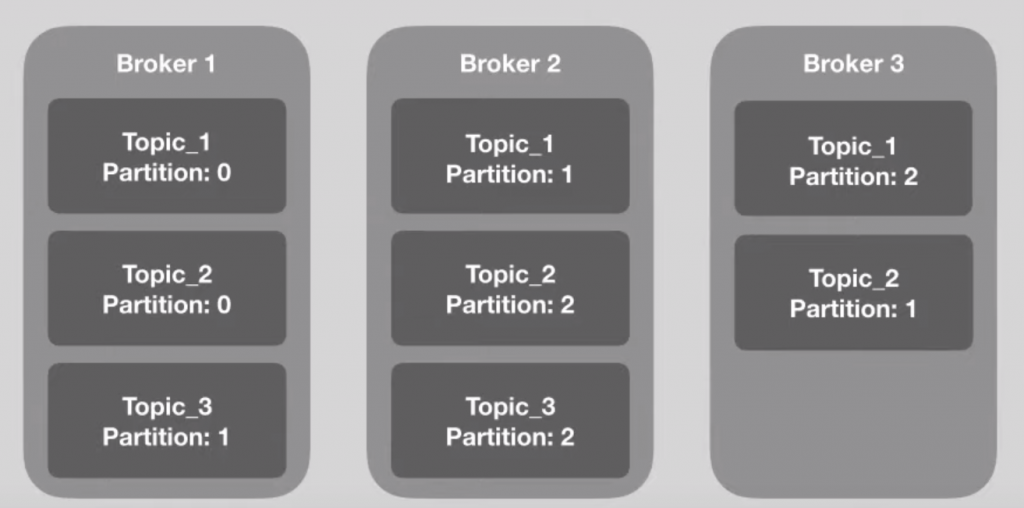
As you can see in the above image, Topic_1 has three partitions, each broker is responsible for a partition of the topic, so, the Replication Factor of the Topic_1 is three.
It’s very important that the number of the partitions match the number of the brokers, in this way, each broker will be responsible for a single partition of the topic.
To ensure the reliability of the cluster, Kafka enters with the concept of the Partition Leader. Each partition of a topic in a broker is the leader of the partition and can exist only one leader per partition. The leader is the only one that receives the messages, their replicas will just sync the data (they need to be in-sync to that). It will ensure that even if a broker goes down, his data won’t be lost, because of the replicas.
When a leader goes down, a replica will be automatically elected as a new leader by Zookeeper.
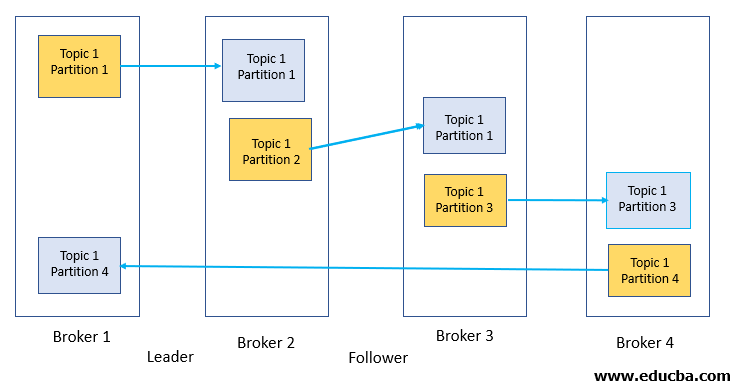
In the above image, Broker 1 is the leader of Partition 1 of Topic 1 and has a replica in Broker 2. Let’s say that Broker 1 dies, when it happens, Zookeeper will detect that change and will make Broker 2 the leader of Partition 1. This is what makes the distributed architecture of Kafka so powerful.
Ref: https://medium.com/swlh/apache-kafka-what-is-and-how-it-works-e176ab31fcd5
Offset:
Older versions of Kafka (pre 0.9) store offsets in ZK only, while newer version of Kafka, by default store offsets in an internal Kafka topic called __consumer_offsets (newer version might still commit to ZK though).
The advantage of committing offsets to the broker is, that the consumer does not depend on ZK and thus clients only need to talk to brokers which simplifies the overall architecture. Also, for large deployments with a lot of consumers, ZK can become a bottleneck while Kafka can handle this load easily (committing offsets is the same thing as writing to a topic and Kafka scales very well here -- in fact, by default __consumer_offsets is created with 50 partitions IIRC).
I am not familiar with NodeJS or kafka-node -- it depend on the client implementation how offsets are committed.
Long story short: if you use brokers 0.10.1.0 you could commit offsets to topic __consumer_offsets. But it depends on your client, if it implements this protocol.
In more detail, it depends on your broker and client version (and which consumer API you are using), because older clients can talk to newer brokers. First, you need to have broker and client version 0.9 or larger to be able to write offsets into the Kafka topics. But if an older client is connecting to a 0.9 broker, it will still commit offsets to ZK.
For Java consumers:
It depends what consumer are using: Before 0.9 there are two "old consumer" namely "high level consumer" and "low level consumer". Both, commit offsets directly to ZK. Since 0.9, both consumers got merged into single consumer, called "new consumer" (it basically unifies low level and high level API of both old consumers -- this means, in 0.9 there a three types of consumers). The new consumer commits offset to the brokers (ie, the internal Kafka topic)
To make upgrading easier, there is also the possibility to "double commit" offsets using old consumer (as of 0.9). If you enable this via dual.commit.enabled, offsets are committed to ZK and the __consumer_offsets topic. This allows you to switch from old consumer API to new consumer API while moving you offsets from ZK to __consumer_offsets topic.
Group coordinator
We saw that the committed offset is stored in __consumer_offset topic partition. Leader brokers of this topic partition will be elected as the group coordinator. It receives the heartbeat of the consumers in the consumer group and helps in assigning partitions to the consumers in the consumer group. How do consumers read from topic partitions?
- When the consumer group is configured, consumers send the request to group coordinator to join the group.
- The first consumer that sends this request will be elected as the leader of the consumer group.
- leader of the consumer group assigns the subset of partitions to each of the consumers and sends this information to the group coordinator.
- The group coordinator is responsible for informing consumers which partition it should read from.
KafkaConsumers request messages from a Kafka broker via a call to poll() and their progress is tracked via offsets. Each message within each partition of each topic, has a so-called offset assigned—its logical sequence number within the partition. A KafkaConsumer tracks its current offset for each partition that is assigned to it. Pay attention, that the Kafka brokers are not aware of the current offsets of the consumers. Thus, on poll() the consumer needs to send its current offsets to the broker, such that the broker can return the corresponding messages, i.e,. messages with a larger consecutive offset. For example, let us assume we have a single partition topic and a single consumer with current offset 5. On poll() the consumer sends if offset to the broker and the broker return messages for offsets 6,7,8,...
Because consumers track their offsets themselves, this information could get lost if a consumer fails. Thus, offsets must be stored reliably, such that on restart, a consumer can pick up its old offset and resumer where it left of. In Kafka, there is built-in support for this via offset commits. The new KafkaConsumer can commit its current offset to Kafka and Kafka stores those offsets in a special topic called __consumer_offsets. Storing the offsets within a Kafka topic is not just fault-tolerant, but allows to reassign partitions to other consumers during a rebalance, too. Because all consumers of a Consumer Group can access all committed offsets of all partitions, on rebalance, a consumer that gets a new partition assigned just reads the committed offset of this partition from the __consumer_offsets topic and resumes where the old consumer left of.
user@192 kafka_2.13-3.1.0 % bin/zookeeper-server-start.sh config/zookeeper.properties
user@192 kafka_2.13-3.1.0 % bin/kafka-server-start.sh config/server.properties
bin/kafka-topics.sh --create --topic topic-1 --bootstrap-server localhost:9092 --replication-factor 1 --partitions 4
bin/kafka-console-consumer.sh \
--bootstrap-server localhost:9092 \
--group GROUP-30 \
--topic topic-1 \
--from-beginning
/bin/kafka-console-producer.sh \
--bootstrap-server localhost:9092 \
--topic topic-1
describe:
bin/kafka-topics.sh --describe --bootstrap-server localhost:9092 --topic topic_replica
create:
bin/kafka-topics.sh --create --bootstrap-server localhost:9092 --replication-factor 1 --partitions 5 --topic topic_replica1
if we are using more replica then broker then error:
Error while executing topic command : Replication factor: 2 larger than available brokers: 1.
[2022-07-18 17:31:23,803] ERROR org.apache.kafka.common.errors.InvalidReplicationFactorException: Replication factor: 2 larger than available brokers: 1.
push data with key:
bin/kafka-console-producer.sh --broker-list localhost:9092 --topic topic_replica1 --property "parse.key=true" --property "key.separator=:
data:
>key1:Value1
>key2:Value2
>key2:Value3
>key2:value4
>key1:value5
>key3:value6
>key4:value7
>key4:value7
>key4:value8
same key data always in same partition:
inside consumer 1
Tópico: {}${topic.name.consumer
key: {}key1
Headers: {}RecordHeaders(headers = [], isReadOnly = false)
Partion: {}0
Order: {}Value1
inside consumer 1
Tópico: {}${topic.name.consumer
key: {}key2
Headers: {}RecordHeaders(headers = [], isReadOnly = false)
Partion: {}1
Order: {}Value2
inside consumer 1
Tópico: {}${topic.name.consumer
key: {}key2
Headers: {}RecordHeaders(headers = [], isReadOnly = false)
Partion: {}1
Order: {}Value3
inside consumer 1
Tópico: {}${topic.name.consumer
key: {}key2
Headers: {}RecordHeaders(headers = [], isReadOnly = false)
Partion: {}1
Order: {}value4
inside consumer 1
Tópico: {}${topic.name.consumer
key: {}key1
Headers: {}RecordHeaders(headers = [], isReadOnly = false)
Partion: {}0
Order: {}value5
inside consumer 1
Tópico: {}${topic.name.consumer
key: {}key3
Headers: {}RecordHeaders(headers = [], isReadOnly = false)
Partion: {}0
Order: {}value6
inside consumer 2
Tópico: {}${topic.name.consumer
key: {}key4
Headers: {}RecordHeaders(headers = [], isReadOnly = false)
Partion: {}4
Order: {}value7
inside consumer 2
Tópico: {}${topic.name.consumer
key: {}key4
Headers: {}RecordHeaders(headers = [], isReadOnly = false)
Partion: {}4
Order: {}value7
inside consumer 2
Tópico: {}${topic.name.consumer
key: {}key4
Headers: {}RecordHeaders(headers = [], isReadOnly = false)
Partion: {}4
Order: {}value8
####
we can add multiple consumer of same group in same java instance in a service like.
@KafkaListener(topics = "${topic.name.consumer}", groupId = "group_id")
public void consume(ConsumerRecord<String, String> payload){
    System.out.println("inside consumer 1");
    System.out.println("Tópico: {}"+ topicName);
    System.out.println("key: {}"+ payload.key());
    System.out.println("Headers: {}"+ payload.headers());
    System.out.println("Partion: {}"+ payload.partition());
    System.out.println("Order: {}"+ payload.value());

}

@KafkaListener(topics = "${topic.name.consumer}", groupId = "group_id")
public void consume2(ConsumerRecord<String, String> payload){
    System.out.println("inside consumer 2");
    System.out.println("Tópico: {}"+ topicName);
    System.out.println("key: {}"+ payload.key());
    System.out.println("Headers: {}"+ payload.headers());
    System.out.println("Partion: {}"+ payload.partition());
    System.out.println("Order: {}"+ payload.value());

}


